
UA Supported Tools
Information regarding supported tools that are available across UA.
Google Gemini (Enterprise)
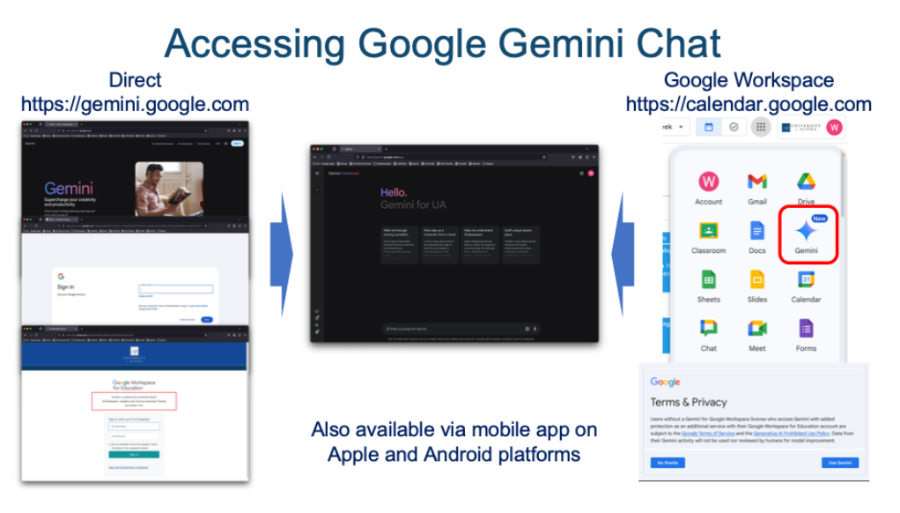
When logging into Google Workspace with your UA account, you will see a Gemini icon
( ) in the Google Apps selection pop-up (
 ) in the upper right corner of the screen adjacent to your account logo. Clicking
on the Gemini icon will navigate to the Gemini chat page where you can interact directly
with the service. If this is your first time accessing Gemini, you will be presented
with a Terms & Privacy page – click on “Use Gemini” to proceed or “No thanks” if you
would prefer to not use the service. You can also navigate directly to Gemini AI and log in with your UA credentials. Gemini is also available via mobile app on Apple
and Android platforms.
Core Applications & Included Features
- Google Docs & Gmail: "Help me write" tools to draft, rephrase, expand, or summarize text.
- In Gmail, you also get automated thread summaries, suggested replies, and inbox AI
Overviews.
- In Gmail, you also get automated thread summaries, suggested replies, and inbox AI
Overviews.
- Google Meet:
- "Take notes for me": Automatically records meeting highlights, action items, and context directly into Google Docs.
- Audio & Video Enhancements: Studio sound, studio lighting, and studio look upscaling.
- Real-time Translation: Live speech-to-speech translation and translated video captions.
- Google Slides & Google Vids:
- Generate custom inline images, slide backgrounds, and presentation layouts.
- Convert Slides presentations into videos, generate AI voiceovers, and use custom digital AI avatars for presentations.
- Google Sheets: Automated table creation for agendas and trackers, enhanced Smart Fill, and AI formula
assist/categorization functions.
- Gemini Notebook (NotebookLM): Grounded AI research notebook where you can upload sources (documents, PDFs, web links)
to generate dynamic study guides, synthesis, and Audio Overviews with expanded limits.
- Standalone Gemini App: Direct access to Google's frontier models for complex reasoning, code generation,
Deep Research, and interactive learning tools.
Institutional Data Security, Limits & Privacy
- Institutional Data Protection: All prompts and content processed under your account remain private. Submissions are not used to train Google’s public large language models (LLMs) and are not subject to human review.
- Usage Limits & Eligibility: Includes significantly expanded usage limits across all generative features compared to standard tiers. Note: Per Google policies, Gemini licenses are available only to users who are 18 years of age or older.
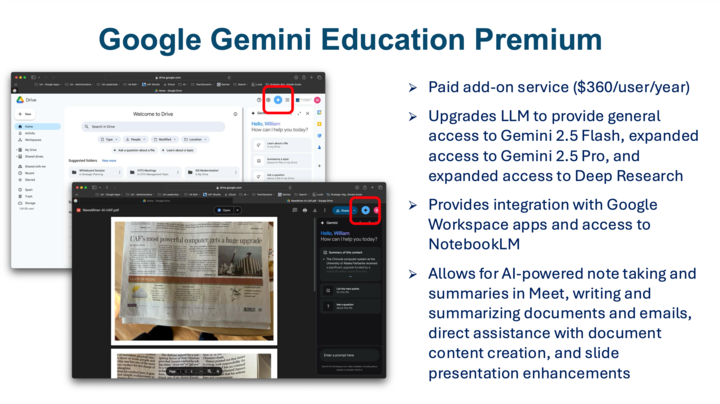
Gemini Education Pro is a paid add-on service that provides access to more advanced LLMs, Gemini 2.5 Flash and 2.5 Pro, and integration with Google Workspace apps like Gmail, Docs, Sheets, and Slides. This allows for AI-powered note taking and summaries in Meet, writing and summarizing documents and emails, direct assistance with document content creation, and slide presentation enhancements. Gemini Education Pro provides data protection assurances for UA users.
The service costs $360/user/year. Please contact your local IT help desk for more information about features or the purchase process.
Users with a Gemini Education Premium subscription will see a gray Gemini logo ( ) just to the left of the Google Apps icon. Clicking on this icon will open a Gemini
sidebar with which you can interact directly without the need to leave the Google
Workspace page. This icon will also appear in the upper right corner of the screen
when using Google apps such as Gmail, Docs, Sheets, and Slides. You can also summarize
documents directly within Google Drive by clicking on the vertical ellipses “More
actions” button to the right of a file and selecting “Summarize this file” (it has
a Gemini icon next to it).
UA's Google Workspace environment, accessed using your UA credentials, is FERPA compliant.
Sensitive Data Handling in AI
Microsoft Copilot (Enterprise)
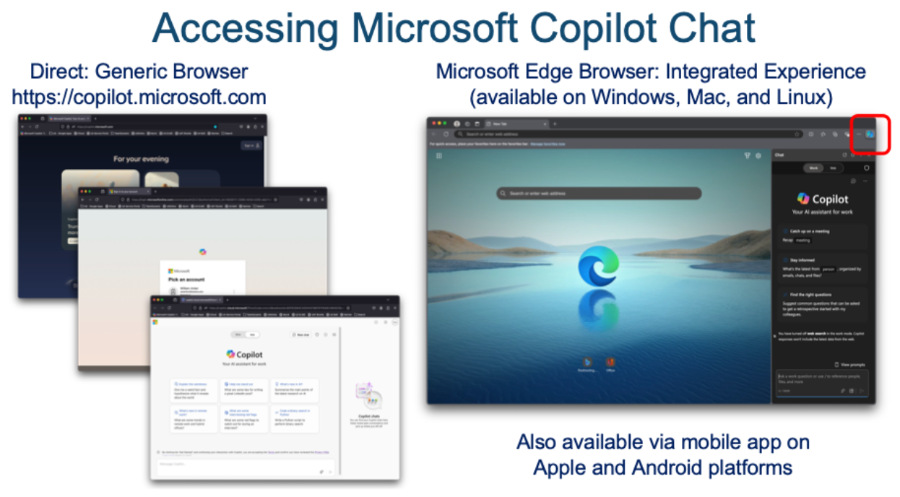
Access Copilot and log in with your UA credentials. Copilot supports most major browsers, including Chrome, Firefox, and Safari, however, Microsoft Edge provides the most stable experience and provides direct integration with the service (Edge is available for Windows, Mac, and Linux).
Creating a profile in Edge for your UA account and logging in will provide direct
access to Copilot from within the browser via an icon ( ) in the upper right of the browser bar. Clicking on the icon will open a prompt sidebar,
eliminating the need to navigate directly to Copilot. Copilot is also available via
mobile app on Apple and Android platforms.
Core Applications & Included Features
- Copilot in Microsoft 365 Desktop & Web Apps:
- Word: Generates first drafts, writes summaries, rephrases text, and transforms notes into formatted documents.
- Excel: Analyzes complex datasets, generates dynamic formulas, highlights trends, and creates visual charts directly via natural language prompts.
- PowerPoint: Turns Word outlines, notes, or raw ideas into formatted slide presentations with auto-generated slide visuals and layouts.
- Outlook: Summarizes long email threads, assists with quick drafting, and drafts responses tailored to tone and context.
- OneNote & Loop: Helps brainstorm, organize notes, summarize action items, and collaborate on shared
workspaces.
- Microsoft Teams Integration:
- Summarizes live meeting discussions, creates real-time action items, and recaps missed calls without needing a full recording transcript.
- Answers specific contextual questions about ongoing or past meetings (e.g., "What decisions were made about project timeline?").
- Work-Grounded Data & Graph Context:
- Uses Microsoft Graph Grounding to search, synthesize, and answer questions using context pulled directly across your internal UA emails, Teams chats, OneDrive files, and SharePoint documents.
- Image & Custom Agent Capabilities:
- Access to Copilot Studio and pre-built agents to design custom AI workflows and research assistants.
- Priority access to image creation models (via Designer/DALL-E) with higher usage generation thresholds.
Institutional Data Security & Privacy
- Enterprise Data Protection (EDP): Because the license is tied to your official
@alaska.eduaccount, all prompts, uploaded documents, and generated outputs remain strictly enclosed within UA's secure tenant boundaries. - No AI Model Training: Your data is never used to train public foundation models, and inputs/outputs are
protected against external exposure.
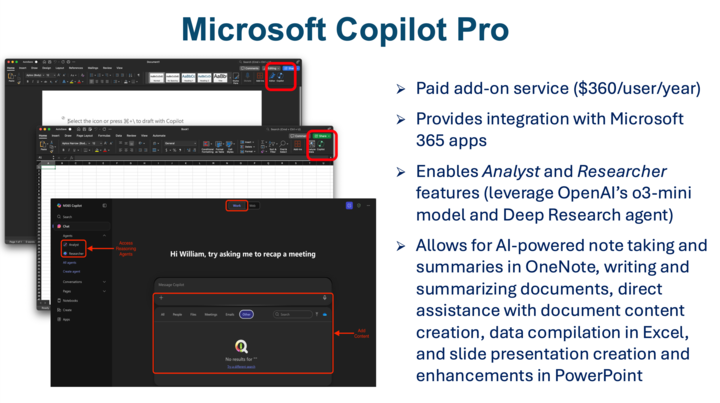
Microsoft Copilot Pro is a paid add-on service that provides integration with the Microsoft 365 environment. It leverages OpenAI’s GPT-4 series of LLMs, enables "Analyst" and "Researcher" features which utilize OpenAI's o3-mini and Deep Research models, grants access to DALL-E 3 (an image generator), and provides integration with Microsoft 365 documents and apps like Word, Excel, and PowerPoint.
This allows for AI-powered note taking and summaries in OneNote, writing and summarizing
documents, direct assistance with document content creation, data compilation in Excel,
and slide presentation creation and enhancements in PowerPoint. Microsoft Copilot
Pro provides data protection assurances for UA users. The service costs $360/user/year.
Please contact your local IT help desk for more information about features or the
purchase process.
Users with a Copilot Pro subscription will see the Copilot logo in the left sidebar when logged into their Microsoft 365 accounts. Clicking on the icon will navigate to the Copilot page. They will also see a Copilot icon in the home menu bar when using Microsoft Office apps – clicking on this icon will open a Copilot sidebar within the app. Hovering over a file within OneDrive will display a grey Copilot icon which will offer the opportunity to directly summarize the file or create an FAQ based on the contents. You can also add one or more files to the prompt area on the main Copilot page and ask Copilot to act on the contents – e.g. to create a basic PowerPoint presentation from a technical document or a cover letter based on a resume and job description.
Zoom AI Companion
Zoom AI Companion provides AI-assisted meeting summaries and smart recording capabilities. Zoom is managed by UAF Nanook Technology Services on behalf of the entire UA community. View documentation and training resources for AI Companion.
Zoom AI Companion is a vendor-supplied add-on service that has been deployed across the UA system. It is managed by UAF Nanook Technology Services and offers meeting summaries and smart recording services. The service provides data privacy assurances and meets HIPAA compliance mandates.
Other AI-based transcription services utilize varying privacy practices and may not comply with UA’s legal and regulatory compliance obligations. Depending on an individual vendor’s policies, user data may be leveraged to train underlying models, shared with third parties, stored outside of the U.S., or used for other purposes.
Many of these tools employ background services that capture broad swathes of user data, including video, audio, screenshots, contents of data files, etc., often without notifying meeting participants. These background services may also connect to other systems end-users have access to, capturing data available to those system accounts as well.
Yes. Zoom AI Companion, Google Gemini, and Microsoft Copilot all offer AI-based meeting recording and transcription services, while providing UA stakeholders with data privacy and compliance assurances.
It is important to keep in mind that AI-based transcription services have varying levels of consistency and accuracy, so be sure to review transcripts before relying on them. For use cases requiring a high degree of accuracy and privacy protection, consider using transcription services that rely on human beings rather than AI.
For example:
Verbatim Transcription Service for Academia
ant - Multilingual Transcription
Canvas
needs content
Blackboard
needs content